Extensible admin interfaces
for FastAPI & Starlette
Generate a complete admin interface from your SQLAlchemy, SQLModel, Beanie, MongoEngine, or Tortoise ORM models. Built on the Tabler UI kit, starlette-admin gives you list views, auto-generated forms, data exports, and secure authentication. Configure the whole interface in Python, without writing any frontend code.
pip install starlette-admin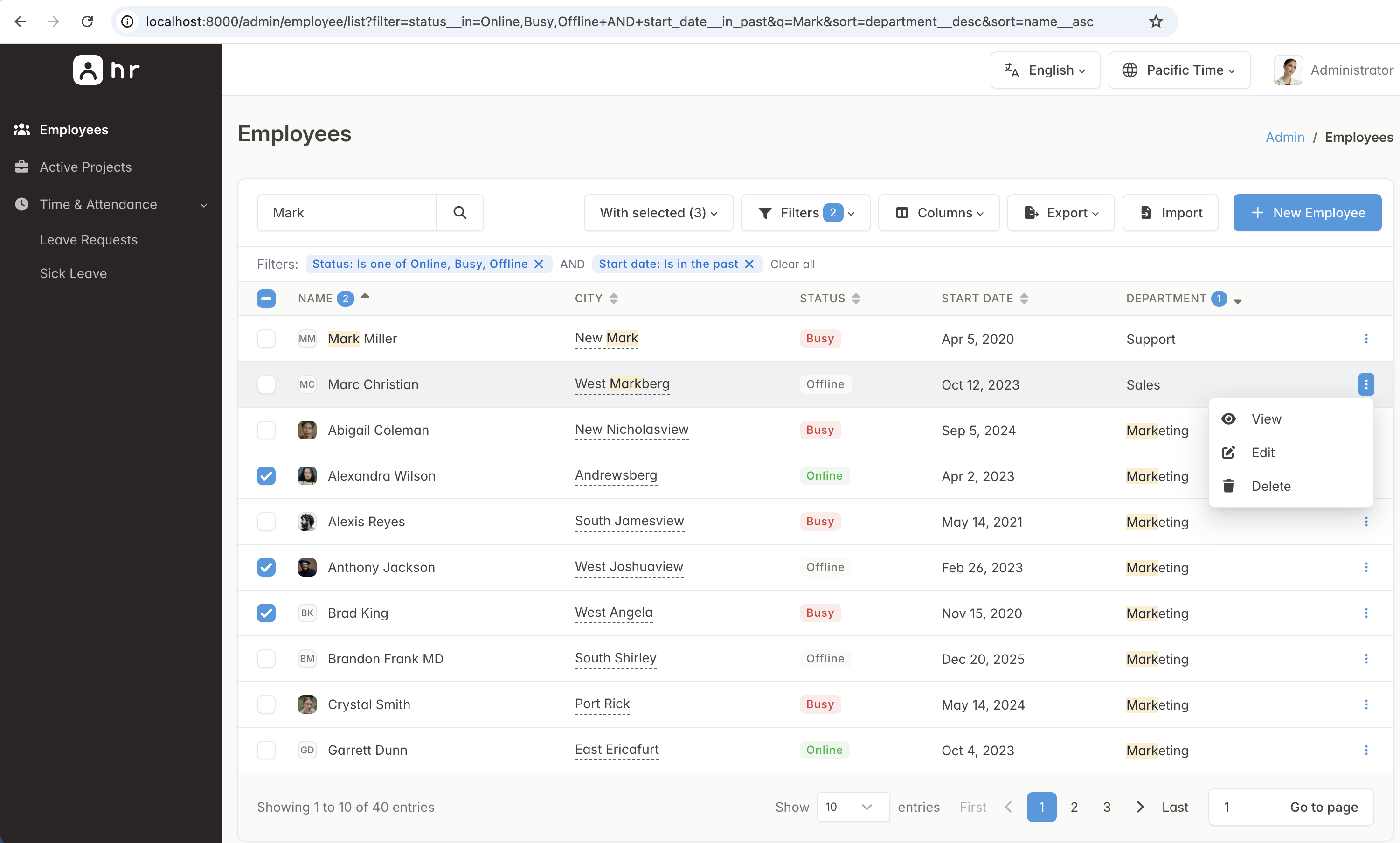
Built-in features
Everything you need works out of the box. Every core feature includes documented extension points, so you can adapt it to your requirements.
Tables
Browse, search, and sort your data with pagination, multi-column ordering, and state-preserving URLs. Edit fields inline from the list view.
Filters
Build nested AND/OR queries in the UI, with type-aware operators for text, numbers, dates, and booleans.
Forms & uploads
Generate forms automatically for more than 25 field types and for relational data. Send file uploads to local or S3 storage.
Actions
Create bulk and row-level operations with standard Python decorators. Gate each run behind confirmation modals and custom payload forms.
Export & import
Export records to CSV, Excel, JSON, PDF, or any format that tablib supports. Import data in bulk with a preview-first wizard that validates every row before it writes to the database.
Auth & security
Connect the authentication provider you already use. Deploy with production-ready defaults, including CSRF protection and built-in limits for exports and imports.
Inline forms
Manage relational data in place. Edit child records inside the parent model form without leaving the page.
Dashboards
Build a home page from built-in statistic, chart, and table widgets, or replace it with a fully custom view.
i18n & timezones
Serve the admin in multiple languages, with locale-aware formatting and precise timezone handling out of the box.
Everything is Python
Build a complete admin interface with a pure Python API designed for rapid development, readable syntax, and long-term maintainability.
Mount the admin panel
Register a model and mount the admin panel on any FastAPI or Starlette application. Then run fastapi dev and open /admin.
from fastapi import FastAPI
from sqlalchemy import create_engine
from starlette_admin.contrib.sqla import Admin, ModelView

from models import Base, Post

engine = create_engine("sqlite:///blog.db")
Base.metadata.create_all(engine)

app = FastAPI()

admin = Admin(engine, title="Blog Admin", secret_key="change-me")
admin.add_view(ModelView(Post, icon="fa fa-newspaper"))
admin.mount_to(app)
Views
Set search, sorting, default ordering, and export formats with plain class attributes. Arrange your create and edit forms with form_layout.
from starlette_admin.contrib.sqla import ModelView


class PostView(ModelView):
    fields = ["id", "title", "author", "content", "published", "created_at"]
    searchable_fields = ["title", "content"]
    fields_default_sort = [("created_at", True)]
    exporters = ["csv", "xlsx", "json"]
    form_layout = [
        ("title", "author"),
        "content",
        ("published", "created_at"),
    ]


admin.add_view(PostView(Post, icon="fa fa-newspaper"))
Fields
Override any auto-detected field to control validation, per-page visibility, and how starlette-admin reads and displays values.
from starlette_admin import DateTimeField, RequestAction, StringField, TextAreaField
from starlette_admin.contrib.sqla import ModelView


class PostView(ModelView):
    fields = [
        "id",
        StringField("title", required=True, help_text="Shown on the blog"),
        TextAreaField("content", exclude_from_list=True),
        StringField(
            "author_email",
            getter=lambda request, obj: obj.author.email,
            formatter={RequestAction.LIST: lambda request, value: value or "unset"},
        ),
        DateTimeField("created_at", read_only=True, exclude_from_create=True),
    ]
Filters
Extend the built-in query builder with custom filters that match your business rules. You can apply the operations you need directly to the underlying database model.
from datetime import datetime
from typing import Any

from starlette_admin.contrib.sqla import ModelView
from starlette_admin.filters.base import BaseFilter, FilterApplyContext, FilterDataType


class ActiveThisMonthFilter(BaseFilter):
    name = "this_month"
    label = "Created this month"
    data_type = FilterDataType.NONE  # No value input. The range comes from now().

    def apply(self, ctx: FilterApplyContext) -> Any:
        now = datetime.utcnow()
        start = now.replace(day=1, hour=0, minute=0, second=0, microsecond=0)
        col = getattr(ctx.view.model, ctx.field_name)
        return col.between(start, now)

class ProductView(ModelView):
    fields = [
        DateTimeField(
            "created_at",
            filters=[ActiveThisMonthFilter, ...],
        ),
    ]
Actions
Attach business operations with a single decorator. Confirmation modals, custom forms, and flash messages are built into the framework.
from starlette.requests import Request
from starlette_admin import ActionSelection, action, flash
from starlette_admin.contrib.sqla import ModelView


class ArticleView(ModelView):
    actions = ["publish", "delete"]

    @action(
        name="publish",
        text="Mark as published",
        confirmation="Publish the selected articles?",
        submit_btn_text="Yes, publish",
    )
    async def publish(self, request: Request, selection: ActionSelection) -> None:
        articles = await selection.rows()
        for article in articles:
            article.published = True
        flash(request, f"{len(articles)} articles published.", "success")
Authentication
Implement three standard methods around your own credential check. starlette-admin handles the login page, sessions, and redirects for you.
from starlette.requests import Request
from starlette_admin.auth import AdminUser, AuthProvider, LoginFailed


class MyAuthProvider(AuthProvider):
    async def login(self, username, password, remember_me, request: Request) -> None:
        if not await check_credentials(username, password):
            raise LoginFailed("Invalid username or password")
        request.session["username"] = username

    async def authenticate(self, request: Request) -> AdminUser | None:
        if username := request.session.get("username"):
            return AdminUser(username=username)
        return None

    async def logout(self, request: Request) -> None:
        request.session.clear()


admin = Admin(engine, auth_provider=MyAuthProvider(), secret_key=SECRET)
Dashboard
Compose the admin home page from statistic, chart, and table widgets that query live data on every request.
from starlette_admin import CardRowWidget, ChartWidget, CustomView, StatWidget

dashboard = CardRowWidget(
    children=[
        StatWidget(title="Orders", value_callback=count_orders, countup=True),
        StatWidget(title="Revenue", value_callback=sum_revenue, color="success"),
        ChartWidget(title="Sales", chart_type="area", series_callback=sales_series),
    ]
)

admin = Admin(
    engine,
    title="Shop Admin",
    secret_key="change-me",
    index_view=CustomView(menu_label="Dashboard", icon="fa fa-home", widget=dashboard),
)
Plugins & extensions
Every layer is replaceable. Package features as self-contained plugins, or hook into a dedicated extension point to tailor the framework to your domain.
Zero-boilerplate plugins
Install a plugin package and pass it to your Admin instance. Fields, converters, templates, and assets wire themselves together automatically.
Hook into any component
Predefined interfaces let you swap or extend each concern independently. Subclass the base class you need and register it. You can customize everything from the authentication flow to the export formats.
- Custom fields
BaseField - Custom filters
BaseFilter - Exporters
BaseExporter - Importers
BaseImporter - Themes
BaseTheme - Auth providers
BaseAuthProvider - Storage backends
BaseStorage - Dashboard widgets
BaseWidget - Templates
templates_dir